> ## Documentation Index
> Fetch the complete documentation index at: https://docs.terracetech.co/llms.txt
> Use this file to discover all available pages before exploring further.
# Growing
> Track batches from seeding to ready, plan production, and analyze how each planting performed.
Growing is where the field meets your orders. Batches follow every crop from seeding to ready, the growing schedule tells your crew what to work and when, and analytics show how each planting performed.
## Batches
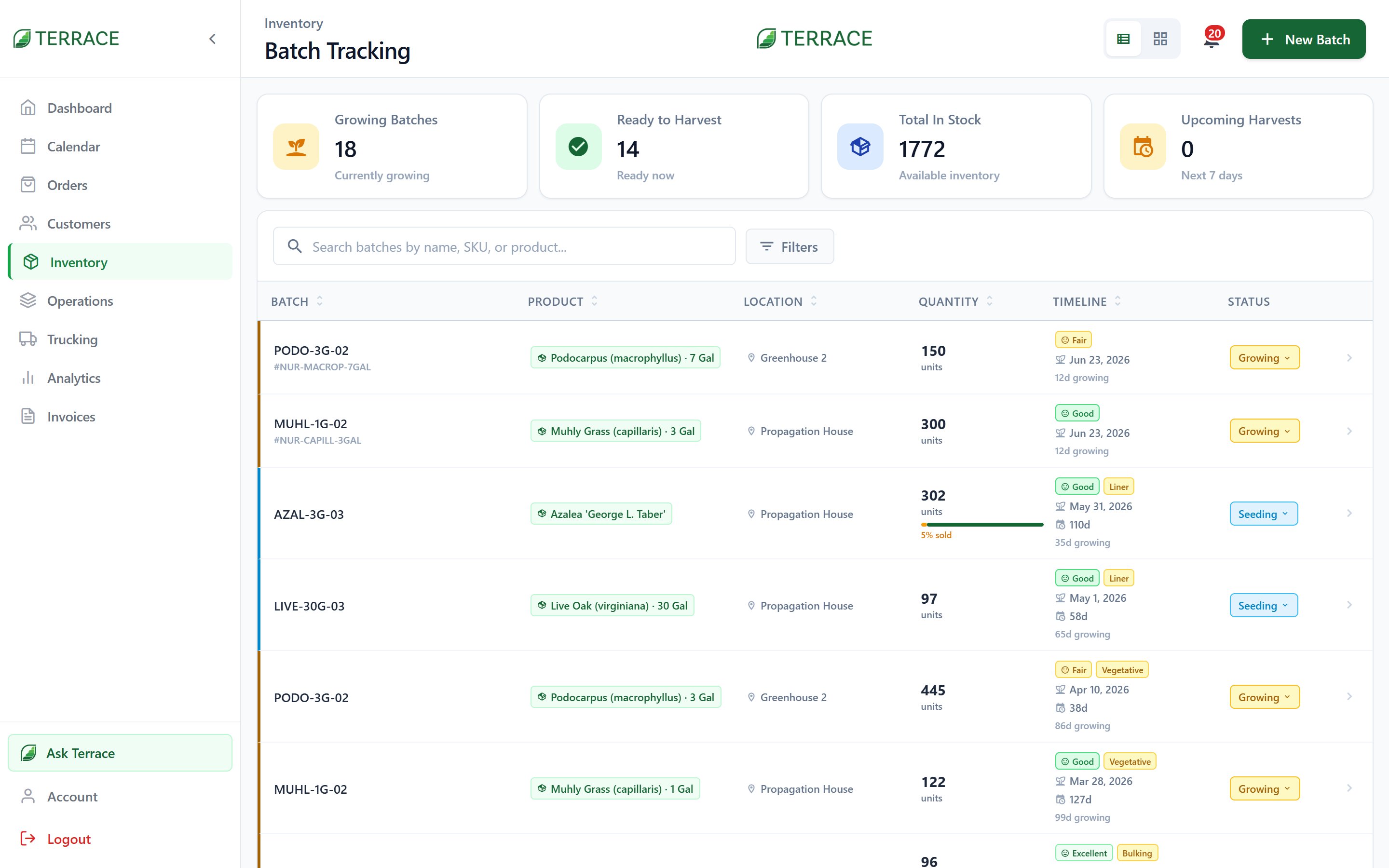 A batch is a lot of product moving through its growing life. Each batch records its **Planted** date, **expected ready date**, location, quantity, a health rating (**Fair**, **Good**, **Excellent**), and a growth stage (**Liner**, **Vegetative**, **Bulking**). It moves through five stages:
| Stage | What it means |
| ------------- | --------------------------------------- |
| **Seeding** | Planted, not yet growing. |
| **Growing** | In the field, maturing. |
| **Ready** | Grown out and available to fill orders. |
| **Harvested** | Pulled and allocated to orders. |
| **Archived** | Closed out. |
Filter the **Batches** screen by stage or by what's due **Today** and **Tomorrow** to see what needs attention.
## The growing schedule
The growing schedule shows orders waiting on product, laid out by **Day**, **Week**, or **Month**, and broken into **Morning**, **Afternoon**, and **Evening** windows. It's the crew's daily answer to "what do we pull today, and how much?"
As you log a batch against an order, Terrace allocates it and moves the order forward, from **Awaiting Harvest** to **Harvested**.
## Batch allocation
When an order commits and more than one batch could supply it, Terrace opens the **batch selector** so you choose exactly which batch to pull from. That keeps traceability intact: every order can tell you which field and planting it came from, and every batch can tell you which customers it went to.
Batches also show in the create-order flow. When adding line items you can see whether product is **Seeding**, **Growing**, **Ready**, or **Harvested**, and promise delivery dates accordingly.
## Growing analytics
The **analytics dashboard** turns your production history into decisions:
* Headline stats: **Total Revenue**, **Total Orders**, **Avg Order**, and **Products** sold.
* Charts by **Revenue**, **Orders**, or **Quantity**, rendered as **Bar**, **Line**, or **Area**.
* Time ranges from **Today** to **All Time**, with **Current Period vs Previous Period** comparison to see if you're ahead of last month, or last season.
Viewing batches and revenue data are separate permissions; a crew member can work the growing schedule without seeing dollar figures.
See how order stages pull from your batches.
A batch is a lot of product moving through its growing life. Each batch records its **Planted** date, **expected ready date**, location, quantity, a health rating (**Fair**, **Good**, **Excellent**), and a growth stage (**Liner**, **Vegetative**, **Bulking**). It moves through five stages:
| Stage | What it means |
| ------------- | --------------------------------------- |
| **Seeding** | Planted, not yet growing. |
| **Growing** | In the field, maturing. |
| **Ready** | Grown out and available to fill orders. |
| **Harvested** | Pulled and allocated to orders. |
| **Archived** | Closed out. |
Filter the **Batches** screen by stage or by what's due **Today** and **Tomorrow** to see what needs attention.
## The growing schedule
The growing schedule shows orders waiting on product, laid out by **Day**, **Week**, or **Month**, and broken into **Morning**, **Afternoon**, and **Evening** windows. It's the crew's daily answer to "what do we pull today, and how much?"
As you log a batch against an order, Terrace allocates it and moves the order forward, from **Awaiting Harvest** to **Harvested**.
## Batch allocation
When an order commits and more than one batch could supply it, Terrace opens the **batch selector** so you choose exactly which batch to pull from. That keeps traceability intact: every order can tell you which field and planting it came from, and every batch can tell you which customers it went to.
Batches also show in the create-order flow. When adding line items you can see whether product is **Seeding**, **Growing**, **Ready**, or **Harvested**, and promise delivery dates accordingly.
## Growing analytics
The **analytics dashboard** turns your production history into decisions:
* Headline stats: **Total Revenue**, **Total Orders**, **Avg Order**, and **Products** sold.
* Charts by **Revenue**, **Orders**, or **Quantity**, rendered as **Bar**, **Line**, or **Area**.
* Time ranges from **Today** to **All Time**, with **Current Period vs Previous Period** comparison to see if you're ahead of last month, or last season.
Viewing batches and revenue data are separate permissions; a crew member can work the growing schedule without seeing dollar figures.
See how order stages pull from your batches.