> ## Documentation Index
> Fetch the complete documentation index at: https://docs.terracetech.co/llms.txt
> Use this file to discover all available pages before exploring further.
# Invoices
> Bill for orders, email customers, track payments, and stay synced with QuickBooks.
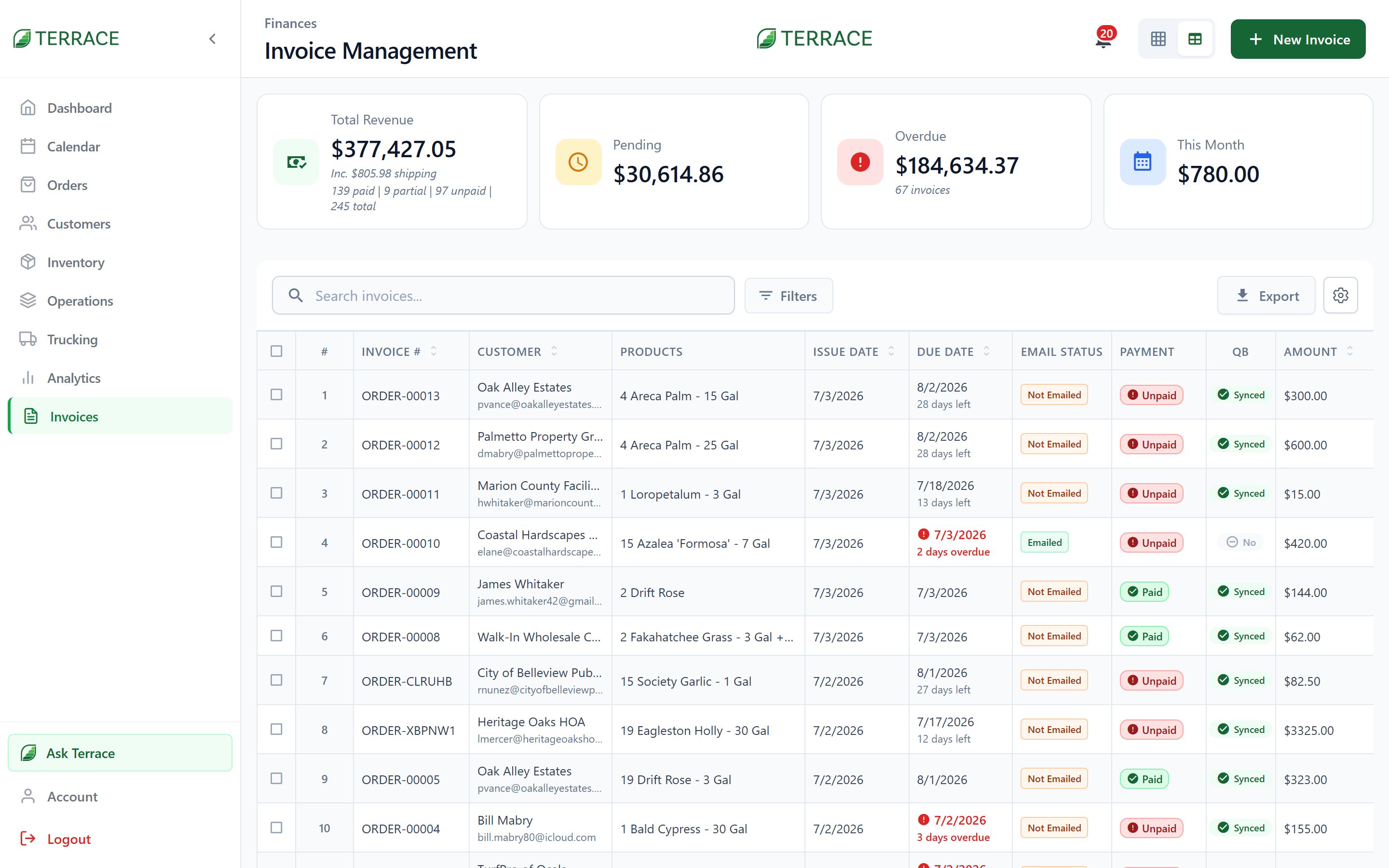
Invoices are how you get paid. Most start from an order, carrying over the customer, line items, and pricing, so billing is a click rather than a re-typing exercise.
 ## Invoice statuses
| Status | What it means |
| ------------------ | ------------------------------------------- |
| **Draft** | Created but not finalized. |
| **Unpaid** | Finalized, awaiting payment. |
| **Partially Paid** | Some payment received; balance outstanding. |
| **Paid** | Settled in full. |
| **Overdue** | Past its due date with a balance. |
Each invoice also tracks its email state (**Not Emailed**, **Emailed**, or **Viewed**) so you know whether the customer has actually seen it.
## Create and send
Generate an invoice from an order (or create one standalone from **+ New Invoice**). Set the **payment terms** (**Due on Receipt**, **Net 7**, **Net 15**, **Net 30**, **Net 45**, or **Net 60**) and the due date follows. Then email it to the customer directly from Terrace. Need to follow up? Send a **Reminder**, or a **Statement** covering everything they owe.
The invoice PDF carries your operation's branding. Logo, position, and footer are set under [Account → Documents](/guides/account).
## Record payments
Log payments as they arrive, full or partial, and Terrace keeps the running balance. Each payment records its method:
**Cash** · **Check** · **Card** · **Bank Transfer** · **Square** · **QuickBooks Payments** · **Other**
Once settled, you can issue a **Receipt**. Recording payments is its own permission, separate from creating or editing invoices.
## Filter and export
Slice the invoice list by status, by date (**Today** through **This Year**, or a **Custom Date Range**), by email state, or by QuickBooks export state (**Exported to QB** / **Not Exported**). The **Export** button produces your books-ready output.
## QuickBooks sync
With the [QuickBooks integration](/guides/integrations) connected, invoices flow to your accounting automatically or on demand. Every invoice shows its sync state, and if an export gets stuck you can use **Export Status Reset** and send it again. Deleted the wrong invoice? **Restore Invoice** brings it back.
Voiding or deleting an invoice affects the linked order and customer balance. Prefer voiding to keep the paper trail; deletion is permission-gated for a reason.
Configure auto-export, sync direction, and reconciliation.
## Invoice statuses
| Status | What it means |
| ------------------ | ------------------------------------------- |
| **Draft** | Created but not finalized. |
| **Unpaid** | Finalized, awaiting payment. |
| **Partially Paid** | Some payment received; balance outstanding. |
| **Paid** | Settled in full. |
| **Overdue** | Past its due date with a balance. |
Each invoice also tracks its email state (**Not Emailed**, **Emailed**, or **Viewed**) so you know whether the customer has actually seen it.
## Create and send
Generate an invoice from an order (or create one standalone from **+ New Invoice**). Set the **payment terms** (**Due on Receipt**, **Net 7**, **Net 15**, **Net 30**, **Net 45**, or **Net 60**) and the due date follows. Then email it to the customer directly from Terrace. Need to follow up? Send a **Reminder**, or a **Statement** covering everything they owe.
The invoice PDF carries your operation's branding. Logo, position, and footer are set under [Account → Documents](/guides/account).
## Record payments
Log payments as they arrive, full or partial, and Terrace keeps the running balance. Each payment records its method:
**Cash** · **Check** · **Card** · **Bank Transfer** · **Square** · **QuickBooks Payments** · **Other**
Once settled, you can issue a **Receipt**. Recording payments is its own permission, separate from creating or editing invoices.
## Filter and export
Slice the invoice list by status, by date (**Today** through **This Year**, or a **Custom Date Range**), by email state, or by QuickBooks export state (**Exported to QB** / **Not Exported**). The **Export** button produces your books-ready output.
## QuickBooks sync
With the [QuickBooks integration](/guides/integrations) connected, invoices flow to your accounting automatically or on demand. Every invoice shows its sync state, and if an export gets stuck you can use **Export Status Reset** and send it again. Deleted the wrong invoice? **Restore Invoice** brings it back.
Voiding or deleting an invoice affects the linked order and customer balance. Prefer voiding to keep the paper trail; deletion is permission-gated for a reason.
Configure auto-export, sync direction, and reconciliation.